

Every website I audit gets the same systematic, step-by-step treatment — no guessing, no shortcuts. Below is the exact checklist I run through, including the advanced checks that most SEOs overlook entirely.
What Is a Technical SEO Audit?
A technical SEO audit is a structured review of a website’s backend infrastructure to find issues that stop search engines from properly crawling, rendering, and indexing your pages. It covers everything from crawlability and site architecture to page speed, Core Web Vitals, mobile usability, security, structured data, and JavaScript rendering — all of which directly affect your search rankings and organic traffic.
Think of it as a full health check for your website. Before you invest in content, backlinks, or on-page SEO, the technical foundation has to be solid. Otherwise, you’re building on shaky ground.
Why Most SEO Audits Fall Short
I’ve audited dozens of websites, and the pattern is almost always the same: the business has invested time and money in content and backlinks, but traffic still isn’t growing. The real culprit is almost always technical — quiet problems working against every other effort.
A well-written blog post means nothing if Google can’t crawl it. A strong backlink profile won’t save a site that loads in 8 seconds on mobile. Technical SEO is the foundation on which everything else is built, and most checklists you’ll find online barely scratch the surface.
This checklist runs through seven structured phases. These are the exact checks I personally run on every website I work on, regardless of size or industry. You work directly with me — not a team of junior analysts.
What’s Inside This Checklist

- Phase 1 — Crawlability & Indexation (6 Checks)
- Phase 2 — Site Architecture & Internal Linking (4 Checks)
- Phase 3 — Page Speed & Core Web Vitals (5 Checks)
- Phase 4 — Mobile & UX Signals (3 Checks)
- Phase 5 — Security & HTTPS (3 Checks)
- Phase 6 — On-Page Technical Elements (4 Checks)
- Phase 7 — Advanced Checks Most Auditors Skip (5 Checks)
Crawlability & Indexation
Can Google Find and Index Your Pages?
This is always my starting point. If search engines can’t access your content, nothing else matters. Before touching a single keyword or backlink strategy, I confirm that the right pages are crawlable and indexed — and the wrong ones aren’t.
GSC Index Coverage
I open the Pages report in Google Search Console immediately. This shows which pages are indexed and which are excluded — and, critically, why. Common issues include “Crawled — currently not indexed” (often a thin content signal), “Discovered — currently not indexed” (usually a crawl budget issue), “Duplicate without user-selected canonical,” and “Blocked by robots.txt.” Each signals a different root cause and requires a different fix. I classify every excluded page as either intentionally excluded (fine) or excluded by mistake (needs fixing).
Robots.txt Audit
A misconfigured robots.txt is one of the most common causes of catastrophic ranking drops I’ve seen. I manually review every Disallow and Allow directive to make sure admin pages, checkout flows, and internal search URLs are correctly blocked — and that important content pages are not accidentally blocked. One of the most dangerous errors I find regularly: a Disallow: / directive left over from a staging environment, blocking Google from the entire site.
User-agent: *
Disallow: /wp-admin/
Disallow: /cart/
Disallow: /?s=
Allow: /wp-admin/admin-ajax.php
Sitemap: https://yourdomain.com/sitemap_index.xml
XML Sitemap
I verify the sitemap is submitted in GSC and returns a 200 status, then audit its contents. Does it include noindex pages? Redirected URLs? Is it missing recently published content? The most common problem: CMS plugins auto-generating sitemaps that include tag pages, author archives, and paginated pages — all of which waste crawl budget without adding SEO value.
Watch out: A sitemap that includes noindex or redirected pages sends conflicting signals to Google. Sitemaps should only list canonical, indexable URLs returning a 200 status.
Canonical Tags
I crawl the entire site and audit every canonical tag. I look for self-referencing canonicals on original pages (correct), canonicals that conflict with redirect targets (problematic), multiple canonical tags on a single page (Google ignores both), and canonicals pointing to noindex or 404 pages (serious error). Canonical mistakes are silent — they don’t throw a crawl error, so they go unnoticed for months while quietly damaging rankings.
Redirect Audit
I map every redirect on the site and check: all permanent redirects use 301 (not 302 unless truly temporary), no redirect chain exceeds one hop, no redirect loops exist, and every redirect target returns a 200 status. Redirect chains waste crawl budget and dilute PageRank. I also confirm that old redirects set up after page deletions or URL changes are still working — these frequently break silently after CMS migrations.
Noindex Tags
I export every page carrying a noindex tag and cross-reference against the site’s content strategy. It’s surprisingly common to find important landing pages or product pages with a noindex tag — usually because a developer added it during staging and forgot to remove it before launch. I also check HTTP response headers for X-Robots-Tag: noindex, which most basic crawlers miss entirely.
Site Architecture & Internal Linking
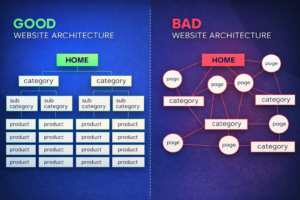
How Well Is Your Site Structured?
Site architecture determines how link equity flows through your website and how easily both users and search engines navigate it. Poor structure means important pages are starved of authority even when the site has strong backlinks. This phase is often where I find the biggest untapped ranking opportunities.
Crawl Depth
I map the full crawl depth of every important page. Best practice: no priority page should be more than three clicks from the homepage. Pages buried five or more levels deep are crawled infrequently and receive very little internal link equity, regardless of their content quality.
Internal Link Audit
I identify all orphan pages — pages with no internal links pointing to them — and check for broken internal links (any internal URL returning a 4xx status). I also audit the quality of anchor text. Over-optimized exact-match anchors and generic “click here” anchors are both problems. Descriptive, varied anchor text is what you want.
Pro tip: I use the “Inlinks” column in Screaming Frog to flag any important page with fewer than 3 internal links. These are immediate candidates for an internal linking boost.
URL Structure
I audit every URL for clean formatting: lowercase letters, hyphens as word separators, no unnecessary parameters, a logical folder hierarchy, and the primary keyword included where appropriate. URLs like /services/technical-seo-audit are far more crawlable than /p=8273&cat=14. I also check for URL parameter bloat — a common problem on e-commerce sites with faceted navigation.
Breadcrumbs
I check whether breadcrumbs are present, functional, and using BreadcrumbList schema markup. Proper breadcrumbs reinforce site hierarchy for Google, give users clear navigation context, and create automatic internal links. I verify that the breadcrumb schema matches the visible breadcrumb trail — mismatches can trigger warnings in GSC’s Enhancements report.
Page Speed & Core Web Vitals
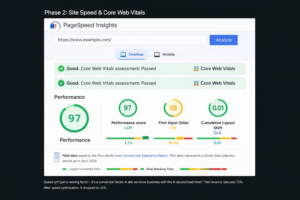
Are Your Pages Fast Enough to Rank?
Page experience is a confirmed Google ranking signal. I don’t just check homepage speed — I test the templates representing the most important page types: homepage, category, and individual post or product page. Speed issues on one template typically apply to hundreds or thousands of pages simultaneously.
Core Web Vitals (Field Data)
I pull field data from GSC’s Core Web Vitals report before running any lab tests. Field data shows how real users on real connections experience each URL — and it’s what Google uses for ranking. Targets: LCP under 2.5 seconds, INP under 200 milliseconds, CLS under 0.1. For LCP specifically, I identify exactly what the LCP element is and trace precisely why it’s slow.
Image Optimization
Images are the single biggest performance issue on most websites. My image checklist: all images use WebP or AVIF format; images are sized appropriately for the viewport; the LCP image has fetchpriority=”high” and is NOT lazy-loaded; all below-fold images ARE lazy-loaded; and all images have explicit width and height attributes to prevent CLS.
html
<!– LCP hero image: preload + high priority –>
<link rel=”preload“ as=”image“ href=”hero.webp“ fetchpriority=”high“>
<img src=”hero.webp“ width=”1200“ height=”600“ fetchpriority=”high“ alt=”…“>
<!– Below-fold images: lazy load –>
<img src=”product.webp“ loading=”lazy“ width=”400“ height=”300“ alt=”…“>
TTFB (Server Response Time)
Time to First Byte should be under 500ms. High TTFB is often a hosting problem but can also stem from unoptimized database queries, absent server-side caching, or no CDN. I test TTFB from multiple geographic locations to separate genuine server slowness from CDN configuration issues.
Render-Blocking Resources
I identify render-blocking scripts and stylesheets delaying the browser from displaying content. Any JS or CSS in the <head> without defer or async attributes blocks rendering. I also check for unused CSS and JavaScript — large bundles shipping code that’s never used on that specific page.
Caching, Compression & CDN
I verify that static assets have proper cache headers and confirm Gzip or Brotli compression is enabled. For sites using a CDN, I verify assets are genuinely being served from edge nodes and that no cache-busting misconfiguration is causing full re-downloads on every visit.
Mobile & UX Signals
Is Your Site Truly Ready for Mobile-First Indexing?
Google has been mobile-first since 2019 — it primarily uses the mobile version of your site for indexing and ranking. Sites that deliver a poor mobile experience are actively working against Google’s priorities. Mobile optimization isn’t a checkbox; it requires genuine hands-on testing.
Mobile Usability Report in GSC
I start with GSC’s Mobile Usability report, which flags text too small to read, clickable elements too close together, content wider than the screen, and incompatible plugins. Each flagged URL gets manually reviewed on a real device — not just simulated in DevTools.
Content Parity (Mobile vs. Desktop)
This is a check that most basic audits miss entirely. Since Google indexes the mobile version, any content hidden on mobile but visible on desktop is effectively invisible to Google’s ranking algorithm. I compare the desktop and mobile HTML source for key pages — verifying that all body copy, structured data, navigation links, and important images exist in the mobile version.
Critical: If your mobile design hides a section of content to save screen space, Google won’t credit that content. Reorganize it responsively rather than hiding it.
Intrusive Interstitials
Google has a specific algorithm targeting intrusive interstitials on mobile. I check for full-screen pop-ups appearing immediately on page load, interstitials that cover the main content and are hard to dismiss, and sticky banners consuming significant screen space. Generic email capture overlays firing on first load are a direct negative signal I flag for removal or timing adjustment.
Security & HTTPS
Is the Site Fully Secure — Not Just Surface-Level?
HTTPS is a confirmed ranking signal and a critical trust signal for both users and browsers. But many sites have only partial security — HTTPS on the surface, with HTTP leaking through in subtle ways that break functionality and damage user trust.
SSL Certificate
I test the SSL certificate through Qualys SSL Labs, looking for an A or A+ grade. I check the expiry date and whether auto-renewal is configured. I also verify the certificate covers all subdomains in use — a certificate that doesn’t cover www.yourdomain.com while the site redirects there causes security errors for every visitor.Mixed Content
Even after a full HTTPS migration, it’s common to find images, scripts, or stylesheets loading over HTTP. Modern browsers block many of these, breaking page functionality or triggering “Not Secure” indicators. I identify every mixed content instance through browser console inspection and crawler analysis.
HTTPS Redirect Completeness
I test that all four homepage variations redirect correctly to the single canonical HTTPS version: http://domain.com, http://www.domain.com, https://domain.com, and https://www.domain.com. Each should resolve to exactly one destination via a single 301. A two-hop redirect (http → https → www) passes less link equity than a single-hop redirect and slows down page load for first-time visitors.
On-Page Technical Elements
The Technical Layer of On-Page SEO
These elements sit right at the intersection of on-page SEO and technical SEO. They’re often managed by content teams without awareness of the technical implications — which is exactly why they go wrong at scale. Getting these right not only helps rankings but also supports CRO optimization, since elements like title tags and meta descriptions directly influence click-through rates from search results.
Title Tags & Meta Descriptions
I export all title tags and meta descriptions from a full site crawl and analyze them for: duplicates, missing values, titles over 60 characters, and missing meta descriptions. A well-crafted meta description won’t directly boost rankings, but it can significantly improve click-through rate — which is one of the most overlooked aspects of CRO optimization. I also look for CMS-generated templates producing identical titles across entire page categories.
Heading Structure
Every page should have exactly one H1 aligned with its target keyword and meta title. I check for pages missing an H1 entirely, pages with multiple H1s (common with page builders), and heading hierarchies that skip levels. Logical heading structure aids both accessibility and Google’s ability to understand the topical priority of your content.
Image Alt Text
I crawl the full site and export every image missing alt text. Every informational image needs a descriptive alt attribute — one that describes what the image actually shows, not keyword-stuffed text. Purely decorative images should use alt=””. Missing alt text fails WCAG accessibility guidelines, makes the site inaccessible to screen reader users, and prevents Google from understanding your images.
Schema Markup
I audit all schema types currently implemented, test them through Google’s Rich Results Test, and identify missed opportunities. Correct schema earns rich results in SERPs — expanding your listing’s visual footprint and improving click-through rates without requiring any ranking change. I also verify that properties like dateModified are dynamically updated, not hardcoded to the original publication date.
json
“@type”: “BreadcrumbList”,
“itemListElement”: [
{“@type”: “ListItem”, “position”: 1, “name”: “Home”, “item”: “https://site.com/”},
{“@type”: “ListItem”, “position”: 2, “name”: “Services”, “item”: “https://site.com/services/”},
{“@type”: “ListItem”, “position”: 3, “name”: “Technical SEO Audit”}
Advanced Checks Most Auditors Skip
Where the Biggest Wins and Hidden Problems Are Found
This is where most generic checklists end. The following checks require more time and deeper expertise — but they’re consistently where I find the most impactful issues. These are the checks that justify a professional SEO audit over a DIY tool report.
Server Log File Analysis
Server logs record every time Googlebot visits your site — which pages it crawls, how often, which it ignores, and what HTTP status codes it receives. This is one of the most underused and most revealing analyses in all of technical SEO. I use log analysis to identify pages Google crawls excessively (often low-value pages consuming disproportionate crawl budget) and important pages Google rarely crawls (a signal they’re hard to reach or low-priority in Google’s view). Most site owners have never opened a log file — the data inside is invaluable.
JavaScript Rendering
If your site uses JavaScript to render content — React, Vue, Angular, or even basic JS-injected text — I compare what Google sees versus what a user sees. Critical content rendered only client-side may not be indexed at all. This is especially common with navigation links built in JavaScript, product content loaded via API calls, and customer reviews pulled client-side.
/* How to check Googlebot’s rendered view:
- GSC → URL Inspection → Test Live URL
- Click “View Tested Page” → “More Info” → HTML tab
- Compare this to your browser’s page source (Ctrl+U)
If they differ significantly — you have a rendering gap.
Content in the browser but missing in GSC = not indexed. */
Crawl Budget Waste
Crawl budget matters most for large sites (10,000+ pages), but I check it on every site. I identify URLs consuming crawl budget without delivering SEO value: paginated archive pages beyond page 2, faceted navigation filter combinations, internal search result URLs, and session IDs appended to URLs. These should be excluded via robots.txt or consolidated via canonicals so Googlebot spends its time on your most valuable content.
Hreflang Validation
For sites serving multiple languages or regions, hreflang errors are among the most complex and consequential technical issues I encounter. I validate: every hreflang tag has a reciprocal tag, language codes follow the correct ISO 639-1 format, x-default is implemented for a language-neutral landing page, and no hreflang tags point to noindex, 404, or redirected URLs. Incorrect hreflang causes Google to serve the wrong language version to users — directly damaging conversion rates in international markets without any obvious warning signal.
Thin Content, Duplicate Content & Cannibalization
Beyond canonical tags, I look for systemic duplicate and thin content issues. Thin pages are evaluated individually: should they be consolidated, expanded, or removed and redirected? I also check for keyword cannibalization — multiple pages competing for the same target keyword — which splits ranking signals and prevents either page from reaching its potential.
What This SEO Audit Covers That Others Don’t
Standard checklists cover the basics — sitemaps, robots.txt, HTTPS, redirects. A thorough SEO audit goes much further. What I layer on top:
- Server log file analysis to see what Googlebot actually crawls versus what you think it crawls
- JavaScript rendering verification to confirm Google sees the same content your users do
- Content parity checks between mobile and desktop under mobile-first indexing
- Crawl budget waste identification across large page sets
- Hreflang validation for multilingual and multi-region sites
- Schema freshness verification (not just implementation)
- On-page SEO technical elements reviewed at scale — not just a single page
- CRO optimization lens applied to meta descriptions, schema, and structured data to improve click-through rates beyond just rankings
These advanced checks are where the most impactful — and most hidden — problems are consistently found. And they’re what separates a real technical SEO audit from a standard tool-generated report.
